Golddrew: A Handwritten Display Font That Delivers Personality—When Used Right
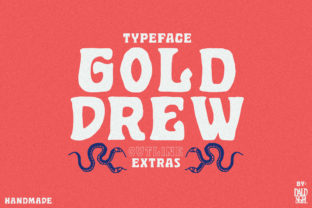
Golddrew is a graceful, hand-crafted display font designed to bring warmth and authenticity to visual communication. Its flowing strokes, subtle texture, and expressive rhythm make it ideal for projects where personality matters—think magazine headlines, boutique branding, wedding invitations, social media graphics, or artisanal product packaging. Unlike generic script fonts, Golddrew includes thoughtful alternate characters that let you fine-tune letterforms for better spacing, visual harmony, or stylistic nuance. But here’s what many overlook: its strengths only shine when matched with intentional usage—not just applied as a decorative afterthought.
Assuming Golddrew Works Well for Body Text (It Doesn’t)
One of the most common missteps is using Golddrew for paragraphs, captions, or interface labels. Its delicate joins, variable stroke width, and decorative flourishes reduce legibility at small sizes and in long reads. Readers may struggle to distinguish similar letters like “a” and “o”, or lose track mid-sentence—especially on mobile screens or lower-resolution displays. This isn’t a flaw in Golddrew; it’s a mismatch of purpose. Display fonts like Golddrew are built for impact, not endurance.
A better approach? Pair it intentionally. Use Golddrew for headlines, logos, or short callouts—and pair it with a clean, highly legible sans serif or serif for body copy. For example, a local bakery’s Instagram post might feature “Hand-Mixed Daily” in Golddrew, while the flavor description (“Vanilla bean & sea salt, baked fresh each morning”) appears in Inter or Lora. That contrast creates hierarchy, improves readability, and lets Golddrew do what it does best: draw attention, not demand decoding.
Overlooking the Power of Alternate Characters
Golddrew includes stylistic alternates—alternate glyphs for letters like “g”, “y”, “f”, and “s”—that help avoid awkward collisions or repetitive rhythms. Yet many users install the font and never access them. They type normally and accept the default forms, missing opportunities to refine spacing or add visual interest.
This oversight becomes obvious in tight settings: “Golddrew” set in all caps may show an overly heavy “w” next to a thin “e”, creating uneven color. Or “love” could look lopsided if the default “v” and “e” don’t balance well together. Design tools like Adobe Illustrator, Affinity Designer, or even modern web platforms with OpenType support let you enable contextual alternates or manually swap glyphs via the Glyphs panel.
Before finalizing a logo or poster headline, spend two minutes experimenting: try swapping one “a” for its alternate, adjust the “t” if it clashes with the following “h”, or test how “&” pairs with surrounding letters. Small refinements like these elevate professionalism without extra cost or time.
Downloading Without Verifying Licensing or Format Compatibility
Golddrew is often shared across free-font sites—but not all versions are identical, licensed, or technically sound. Some downloads lack the full character set (missing accents, numerals, or punctuation), others omit OpenType features entirely, and some carry unclear or restrictive licenses—especially for commercial use like client work or product packaging.
Using an unlicensed or incomplete version can delay projects, trigger legal concerns, or cause rendering issues across devices. A social media graphic might look perfect on your Mac but render jagged or fallback to system fonts on Android or older browsers.
Always source Golddrew from the original designer or a reputable foundry. Check the license explicitly: Does it cover web embedding? Social media? Merchandise? Does it include both desktop and web formats (WOFF2, OTF, TTF)? And verify the download includes a README or documentation—not just a ZIP file named “handwriting-font.zip”. Reputable sources also provide preview tools so you can test how Golddrew behaves with your actual text before committing.
Mistaking Visual Appeal for Strategic Fit
Golddrew feels personal and inviting—which makes it tempting for brands aiming for “friendly” or “artisanal”. But tone isn’t just about aesthetics; it’s about alignment. A fintech startup promoting AI-powered retirement planning might unintentionally undermine credibility by using Golddrew for its main tagline. Similarly, a law firm’s holiday card could feel out of place if the font’s playfulness overshadows trust and clarity.
Ask yourself: Does Golddrew reflect the values *and* expectations of your audience? Does it complement—not compete with—your imagery, color palette, and voice? Test it contextually: paste your actual headline into a mockup alongside real photos and supporting text. If the font draws attention *away* from your message—or makes readers pause to process the lettering instead of absorbing meaning—you’ve got a fit issue, not a design issue.
Skipping Kerning and Tracking Adjustments
Golddrew’s organic flow means default spacing isn’t always optimal. Letters like “To”, “Va”, or “We” often need manual kerning to prevent awkward gaps or unintended overlaps. Auto-kerning in most apps won’t catch these nuances—especially in display settings where spacing affects perception more than in body text.
For instance, “Gold Drew” set in Golddrew may look like two separate words unless the “d” and “D” are nudged closer. Or “The End” might appear disjointed if the “T” and “h” sit too far apart. These aren’t errors in the font—they’re natural consequences of hand-drawn variation.
Take 60 seconds before exporting: enable kerning (Optical or Metrics in Adobe apps), then manually adjust problematic pairs. Most design software shows a kerning value (in thousandths of an em); even +5 or −15 can make a visible difference. When in doubt, step back and squint—does the line feel rhythmically balanced? If one area pulls your eye more than the rest, that’s your cue.
What to Check Before You Commit
- Licensing scope: Confirm permissions for your specific use case—web, app, print, merchandise, or client deliverables.
- Character coverage: Ensure diacritics, currency symbols, and language-specific glyphs (like ñ, ü, or €) are included if needed.
- Format readiness: Verify you have both desktop (OTF/TTF) and web-ready (WOFF2) files if publishing online.
- Software compatibility: Test in your primary tools—some older versions don’t fully support OpenType features like stylistic sets.
- Real-world pairing: Try Golddrew with your brand’s existing typefaces and colors—not just on a white background.
Golddrew isn’t just another handwritten font—it’s a tool for intentional expression. Used thoughtfully, it adds humanity to digital spaces and distinction to physical ones. The difference between “nice-looking” and “memorably effective” often comes down to checking one extra setting, testing one extra pair, or choosing one more appropriate alternative. That attention doesn’t slow you down—it sharpens your results.