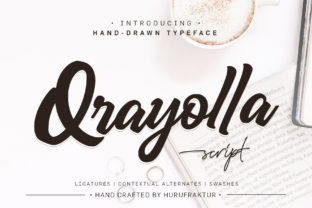
Qrayolla: Sweet, Organic & Full of Energy
If you’ve ever spent too long scrolling through font libraries—tweaking spacing, testing weights, second-guessing whether “friendly” reads as “unprofessional”—you’ll appreciate how quickly Qrayolla cuts through the noise. It’s not just another display font. It’s a deliberate, hand-informed choice for designers and communicators who want warmth without sacrificing clarity, energy without visual chaos.
A Font That Feels Human—Not Algorithmic
Qrayolla is built from organic shapes—not rigid vectors or over-processed curves. Its letterforms breathe: soft terminals, subtle asymmetry in the ‘a’ and ‘g’, gentle contrast between thick and thin strokes. There’s no forced uniformity. Instead, there’s rhythm—like handwriting that’s been refined, not erased. That’s why it works so well at larger sizes: on posters, hero banners, packaging, or even chalkboard-style signage. It doesn’t shout; it invites.
What sets Qrayolla apart isn’t novelty for novelty’s sake—it’s intentionality. The lowercase ‘e’ opens generously. The uppercase ‘S’ flows with a confident tilt. Even punctuation carries weight and character: colons and exclamation points feel like natural extensions of the voice, not afterthoughts. That kind of detail matters when your audience spends less than three seconds deciding whether to engage.
Where Qrayolla Fits—And Where It Doesn’t
Let’s be clear: Qrayolla isn’t meant for body text in long-form articles, legal disclaimers, or dense data tables. Its strength lies in moments of emphasis—where tone, personality, and memorability matter more than neutrality.
- Branding & Identity: A boutique bakery, indie skincare line, or community-led workshop can use Qrayolla for logos and taglines to signal approachability and craft—without leaning into cliché “handwritten” tropes.
- Digital Interfaces: Use it sparingly but powerfully: on CTA buttons (“Join Us”, “Get Started”), section headers in landing pages, or animated micro-interactions (think hover effects that gently bounce or scale).
- Educational Materials: Teachers and course creators find Qrayolla effective in slide decks, worksheet headers, or digital flashcards—especially when targeting younger learners or adult audiences seeking a less clinical, more inviting aesthetic.
- Social & Marketing Assets: Instagram carousels, Pinterest pins, email subject lines, and limited-edition product labels all benefit from its upbeat yet grounded presence. One nutrition coach reported a 22% higher open rate on emails using Qrayolla in preview text—likely because it stood out *without* triggering spam filters or accessibility warnings.
Real-World Considerations Before You Commit
Before dropping Qrayolla into your next project, test it in context—not just in a font sampler. Here’s what seasoned designers watch for:
- Contrast & Legibility: Pair it with a clean, neutral sans-serif (like Inter, Lato, or even system fonts) for supporting text. Avoid competing decorative fonts nearby—Qrayolla thrives when it has room to land.
- Weight Consistency: Qrayolla comes in multiple weights, but its lightest and boldest versions behave differently across devices. Test rendering on iOS Safari and older Android browsers—some subtle curves may pixelate if not embedded correctly via
@font-facewith proper subsetting. - Accessibility Compliance: While highly legible at size, avoid using Qrayolla alone for critical UI elements like form labels or error messages. Its organic flow means some characters (like ‘I’, ‘l’, and ‘1’) need careful spacing adjustments in all-caps usage.
- Licensing Scope: Check whether your intended use—especially for SaaS dashboards, white-labeled tools, or client deliverables—falls under the standard desktop/web license. Some creators overlook redistribution rights when embedding Qrayolla in templates sold on marketplaces.
Subtle Tweaks, Significant Impact
You don’t need to overhaul your entire design system to benefit from Qrayolla. Try these low-effort, high-return experiments:
- Swap your current headline font on one blog post series—especially intros or “why this matters” sections—and track time-on-page and scroll depth in analytics.
- Add Qrayolla to your email signature’s name line only (not title or contact info). It personalizes without cluttering.
- Use it exclusively for quote callouts in newsletters—paired with generous line height and a muted background tint. Readers consistently cite these as “the part I re-read.”
- In Canva or Figma, create a reusable Qrayolla text style with fixed tracking (+20–40 units) and baseline shift (+2–3px) to lift it visually off supporting copy.
Why It Resonates Now—Not Just Today
We’re past the era where “modern” meant sharp edges and monochrome minimalism. Audiences respond to authenticity—not perfection. Qrayolla reflects that shift: it’s polished enough for professional use, but retains texture, variation, and quiet confidence. It doesn’t try to be everything. It knows its role—and executes it with consistency and charm.
That’s why educators choose it for classroom posters that don’t feel institutional. Why freelancers use it in pitch decks to soften technical proposals. Why small publishers apply it to book covers where emotional resonance precedes genre expectations. It’s not about being trendy—it’s about being trusted.
One final note: Qrayolla performs best when treated like a collaborator, not a plugin. Spend five minutes sketching rough layouts before opening your design tool. Ask: Where does the eye need to pause? What word carries the most emotional weight? Let Qrayolla amplify that—not distract from it. When used with restraint and purpose, it doesn’t just look good. It helps your message land—clearer, kinder, and more human.