Lolly Pop: A Friendly Display Font for Warm, Approachable Design
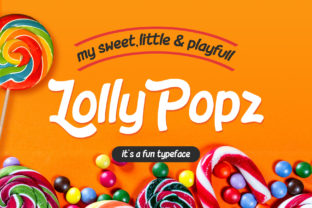
When you're designing a website, marketing campaign, or product packaging—and your goal is to communicate joy, warmth, or lighthearted authenticity—the right typeface can do more than look good. It can invite connection. Lolly Pop is a sweet and happy display font designed precisely for that purpose: to convey friendliness through smooth curves, gentle swashes, and a consistently upbeat rhythm. It’s not a workhorse text font meant for long paragraphs—it’s a strategic visual tool for moments where tone matters most.
Why Tone-Driven Typography Matters in Real-World Design
Adults making design decisions—whether for a small business, nonprofit, educational resource, or personal brand—often face the same quiet challenge: how to stand out without seeming gimmicky, or feel welcoming without sacrificing professionalism. You might be launching a children’s learning app, rebranding a local bakery, creating invitations for a community event, or designing social media graphics for a wellness coach. In each case, the message isn’t just *what* you say—it’s *how it feels* when someone sees it.
That’s where fonts like Lolly Pop become functional, not decorative. Unlike rigid, geometric sans-serifs or overly formal serifs, Lolly Pop carries emotional resonance built into its letterforms. Its soft terminals, balanced x-height, and playful yet controlled swashes (especially on capital letters and select lowercase forms) create immediate visual warmth—without leaning into cartoonishness or nostalgia.
How Lolly Pop Solves Common Design Challenges
Let’s be practical: you’re likely weighing real constraints—tight timelines, limited design experience, budget-conscious tools, or the need to maintain consistency across platforms. Here’s how Lolly Pop helps bridge those gaps:
- Speeds up visual alignment with brand voice. If your mission centers on kindness, playfulness, or care (e.g., early childhood education, mental health resources, handmade goods), Lolly Pop reduces the need for heavy illustration or complex layout tricks to signal tone.
- Improves readability at a glance. Its open counters and generous spacing make it highly legible in headlines, banners, and short callouts—even on mobile screens—so your key message lands quickly.
- Supports accessibility-aware design. While not a UI font for body text, Lolly Pop performs well as a large-scale display element when paired with a clear, accessible sans-serif for supporting copy (like Inter, Open Sans, or Roboto). This pairing balances personality with function.
- Works across print and digital. Whether you’re ordering custom stickers, designing Instagram story templates, or printing workshop handouts, Lolly Pop scales cleanly and retains its charm without pixelation or distortion.
Practical Applications—and What to Watch For
Use Lolly Pop where impact and emotion are priorities—not where neutrality or dense information delivery is required. Think of it as your “first impression” font.
Great fits include:
- Logo lockups or wordmarks for lifestyle brands, cafes, creative studios, or family-run services
- Website hero section headlines (“Welcome to Our Garden Studio”) or CTA buttons (“Join the Fun!”)
- Social media graphics—especially for announcements, seasonal offers, or community spotlights
- Event signage, birthday invitations, or classroom posters where approachability encourages participation
- Book covers or chapter headings for middle-grade fiction, self-help titles with uplifting themes, or illustrated nonfiction for young readers
Less ideal for:
- Long-form web content, legal disclaimers, or data tables
- Small-label typography (e.g., product ingredient lists or clothing tags)
- Situations requiring strict brand neutrality—such as financial compliance materials or government service portals
If you’re using Lolly Pop in digital projects, test contrast carefully. Its rounded, low-contrast strokes can fade against busy backgrounds or light grays. Pair it with deep charcoal, navy, or rich earth tones—not pale pastels—unless you’re intentionally going for softness and have ample whitespace to support it.
Tailoring Lolly Pop to Your Role and Resources
Your relationship to Lolly Pop will vary depending on your role—and that’s okay. A solo entrepreneur might use it directly in Canva or Adobe Express to refresh their Instagram grid in under an hour. A marketing manager may collaborate with a designer to ensure Lolly Pop appears only in approved contexts—say, email headers and promo banners—while keeping body copy in a WCAG-compliant font. A teacher preparing classroom materials might download the free version (if available) and use it in Google Slides to make vocabulary cards feel inviting—not intimidating—to emerging readers.
For developers integrating Lolly Pop into a website, remember: always load it as a display font, not a fallback. Use @font-face or a trusted font host, and declare it in CSS with font-display: swap to avoid invisible text during loading. And never substitute Lolly Pop for system fonts in navigation menus or form labels—clarity and speed come first there.
Getting Started Thoughtfully
Before downloading or licensing Lolly Pop, ask yourself two questions:
- Does this font reflect the feeling I want people to carry away? If your goal is trust through stability, a clean serif or humanist sans may serve better. But if warmth, inclusivity, or joyful energy is core to your message—Lolly Pop is a strong ally.
- Do I have the supporting elements in place? A friendly font shines brightest alongside thoughtful color choices, intentional whitespace, and inclusive imagery. Don’t expect Lolly Pop to compensate for cluttered layouts or inconsistent messaging.
Finally, consider pairing it intentionally. Try Lolly Pop for headlines with Inter or Source Sans Pro for body text—fonts that share its openness and clarity but prioritize function. That combination creates hierarchy, harmony, and usability—all while keeping your voice unmistakably kind.
In a digital landscape full of sharp edges and hurried scrolling, choosing a font like Lolly Pop is a small but meaningful act of intention. It says: We see you. We welcome you. We made space for joy here. When used with purpose—not just prettiness—it becomes more than typography. It becomes part of your commitment to human-centered design.