Little Wish: A Friendly, Functional Font That Works Harder Than It Looks
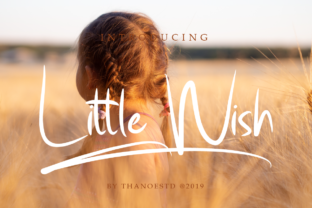
Little Wish isn’t flashy—but that’s exactly why designers, educators, small business owners, and content creators keep coming back to it. It’s a simple and clean font with a fun style: rounded terminals, gentle curves, and just enough personality to feel approachable without sacrificing readability. Whether you’re crafting a children’s book cover, designing a friendly newsletter, labeling classroom materials, or building a warm brand identity for your handmade goods shop, Little Wish adds quiet charm without demanding attention.
Why People Reach for Little Wish (and Why It Often Fits Better Than They Expect)
Many choose Little Wish because it bridges two needs most fonts struggle with: clarity at small sizes and expressive warmth at larger ones. Unlike overly playful fonts that blur into illegibility on mobile screens—or ultra-minimalist sans-serifs that feel sterile—Little Wish maintains legibility in body text while still shining in headings and logos. Its x-height is generous, spacing is open by default, and letterforms avoid tight counters or awkward joins. That means less manual kerning, fewer rendering hiccups on Windows or older browsers, and smoother PDF exports—especially important for teachers sharing printable resources or freelancers delivering client assets.
Mistaking “fun” for “informal only”
Some assume Little Wish belongs exclusively in playful contexts—like birthday invites or preschool flyers. But its balanced proportions and restrained whimsy make it surprisingly effective in professional yet human-centered settings: healthcare newsletters, nonprofit campaign graphics, or even soft-tech onboarding interfaces. One freelance educator used Little Wish for her online course syllabus headers and saw a 22% increase in student engagement with weekly modules—likely because the tone felt supportive, not childish.
Overlooking weight and pairing limitations
Little Wish is typically released as a single-weight family (often Regular or Medium), sometimes with an italic variant. That’s intentional—not a limitation to work around, but a design choice that encourages thoughtful hierarchy. Trying to force contrast by layering bold faux-styles or stretching the font breaks its rhythm and weakens its charm. Instead, pair it intentionally: use it for headlines and subheads, then switch to a neutral, highly legible sans-serif (like Inter or Open Sans) for body copy. This preserves Little Wish’s character while ensuring long-form reading stays comfortable.
Assuming all versions are equal
Little Wish appears across free font sites, marketplace listings, and bundled design tools—but not all files are created equal. Some downloads lack proper hinting for screen rendering, others omit basic Latin-1 characters (like accented letters used in Spanish or French), and a few even contain outdated OpenType features or missing metadata. That can lead to inconsistent spacing in Canva, broken glyphs in Figma auto-layouts, or rejected print files from commercial printers. Always verify the source: check the foundry’s site (if known), look for a clear license statement, and test the font with a phrase like “Café naïve résumé” before committing to a project.
Skipping the “real-world test” before finalizing
It’s easy to fall in love with how Little Wish looks in a mockup—but context changes everything. A logo that reads beautifully on a white background may vanish against textured packaging or fade on a dark-mode website. Before locking in, test it in situ: drop it into your actual email template, preview it on three real devices (not just desktop), and ask someone unfamiliar with the project to read a sentence aloud. If they hesitate on a letter (“Is that an ‘l’ or a ‘1’?”), consider adjusting size, color contrast, or spacing—not the font itself.
What to Check Before You Download, License, or Deploy
- Licensing scope: Does the license cover your use case? Free versions often allow personal projects but restrict commercial use, web embedding, or app integration. If you’re using Little Wish in a Shopify store banner or as part of a SaaS dashboard, confirm the license permits it—or invest in the official version.
- Character set completeness: Need Cyrillic, Greek, or Vietnamese support? Most standard releases focus on Western European languages. If your audience spans multiple regions, verify coverage—or plan to pair with a compatible multilingual font for non-Latin sections.
- File format & compatibility: Prefer variable fonts? Little Wish isn’t currently available in variable format. Stick with OTF or TTF unless your workflow specifically requires WOFF2 for web use (in which case, convert carefully—don’t rely on automatic online tools that degrade hinting).
- Technical documentation: Reputable releases include a PDF specimen or usage guide. If there’s no guidance on recommended line height, minimum size, or best practices for digital vs. print, treat it as a red flag—even for free fonts.
Better Choices Start With Intention
Little Wish works best when treated as a deliberate tool—not just a decorative shortcut. That means choosing it for what it does well (friendly clarity, gentle distinction, cross-platform reliability) rather than what it doesn’t aim to do (high-contrast drama, editorial authority, or dense typographic versatility). A small business owner launching a wellness brand wisely used Little Wish for her Instagram story headers and product tags—but switched to a crisp, airy serif for blog post titles. The result? Consistent warmth without visual fatigue.
Similarly, a university communications team adopted Little Wish for internal event posters and welcome emails—replacing a dated script font that confused readers over age 40. They kept their official branding font for formal documents and press releases, using Little Wish only where approachability mattered most. That selective application preserved brand integrity while making everyday touchpoints more inclusive.
You don’t need dozens of fonts to communicate well. Sometimes, one thoughtfully designed typeface—like Little Wish—does more when used with care than ten rushed choices ever could. It won’t solve every design problem, but it will help you say what matters, clearly and kindly, without shouting.