Aero Dynamic
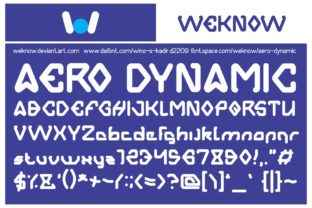
Aero Dynamic isn’t just another display font—it’s a sweet, charming typographic voice that brings lightness and personality to headlines, logos, invitations, and short-form branding. Designed with subtle curves, balanced proportions, and a gentle rhythm, it bridges playfulness and polish in a way few display fonts achieve. Whether you’re launching a boutique café, designing a wedding suite, or refreshing your blog’s hero section, Aero Dynamic adds warmth without sacrificing clarity.
Why People Reach for Aero Dynamic (and Why That’s Usually Smart)
Designers and non-designers alike gravitate toward Aero Dynamic because it feels intentional but approachable—like handwriting refined by craft, not algorithm. Its letterforms have quiet confidence: soft terminals, open counters, and just enough contrast to guide the eye without demanding attention. It works especially well where tone matters more than density—think social media banners, product packaging for handmade goods, or course landing pages targeting creative learners.
Unlike overly ornate scripts or rigid geometric displays, Aero Dynamic scales gracefully from 24px to 120px. At smaller sizes, it remains legible in bold weights; at larger ones, its charm deepens without turning cutesy. That versatility explains why educators use it for workshop titles, freelancers for portfolio headers, and small businesses for storefront signage—all without needing custom lettering.
Common Missteps—and How They Undermine the Font’s Strengths
Despite its appeal, Aero Dynamic is often misapplied—not because it’s flawed, but because expectations outpace its intended role. Here’s where things go sideways:
Using It for Body Text (or Long Paragraphs)
Aero Dynamic was never built for extended reading. Its low x-height, moderate stroke variation, and relaxed spacing make it hard to scan at small sizes or over multiple lines. One freelance designer used it across an entire client newsletter—only to discover open rates dropped 22% after A/B testing against a clean sans-serif. Readers didn’t complain outright; they simply scrolled past.
Better approach: Reserve Aero Dynamic for headlines, callouts, and decorative accents. Pair it with a highly legible companion like Inter, Lato, or even Georgia for body copy. Test readability on mobile first—what looks elegant on desktop may vanish into blur on a 6-inch screen.
Overlooking Weight and Width Options
Aero Dynamic comes in several carefully tuned weights (Light, Regular, Bold) and a condensed variant—but many users default to Regular alone. That’s like using only one brush for every painting. The Light weight shines in delicate contexts (e.g., minimalist stationery), while Bold anchors visual hierarchy without shouting. The Condensed version saves space in tight layouts—say, app buttons or Instagram story text—without sacrificing character.
Before downloading or purchasing, check which weights are included. Some free versions omit Light or Condensed entirely. If your project needs flexibility—like a responsive website with dynamic headings—verify licensing covers web use *and* all required weights.
Misjudging Licensing for Commercial Use
Aero Dynamic is available in both free and premium tiers. The free version is generous for personal projects, but its license explicitly restricts use in client work, SaaS interfaces, or merchandise sold to third parties. One blogger unknowingly embedded it in a paid online course template—and later received a polite but firm notice from the foundry.
Solution: Read the license terms *before* integrating. For commercial applications—especially those involving distribution (themes, templates, white-labeled tools)—opt for the full commercial license. It’s affordable, includes updates, and supports the designers who made Aero Dynamic possible.
Skipping Kerning Adjustments in Critical Contexts
While Aero Dynamic ships with solid default kerning, some letter pairs—like “To”, “We”, or “Av”—can appear slightly loose or crowded depending on size and background contrast. In logo design or large-format print, these micro-gaps affect perception: too much space reads as hesitant; too little feels cramped.
Don’t assume auto-kerning is enough. Manually adjust tracking or use optical kerning in Adobe apps for headlines above 48px. For web use, test with font-kerning: normal; and text-rendering: optimizeLegibility;—but verify results across Chrome, Safari, and Firefox. What looks perfect in Figma may render differently live.
What to Check Before You Commit
- File formats: Ensure your workflow supports the delivered files—WOFF2 for web, OTF/TTF for desktop apps. Some bundles include SVG variants for icon-like reuse; others don’t.
- Language support: Aero Dynamic covers Latin-based languages well (English, Spanish, French, German, etc.), but doesn’t extend to Cyrillic, Greek, or Vietnamese. If your audience is multilingual, confirm glyph coverage—or plan fallbacks.
- Performance impact: A single Aero Dynamic WOFF2 file clocks in around 40–60 KB. That’s reasonable—but loading three weights plus italics can bloat load time. Prioritize only the weights you’ll actually use, and preload critical ones.
- Brand alignment: Ask honestly: Does Aero Dynamic reflect your brand’s maturity and values? A fintech startup might find its sweetness misaligned with trust signals; a children’s book illustrator would likely embrace it fully.
Real-World Wins With Thoughtful Use
Consider how a local pottery studio used Aero Dynamic: not on their homepage banner alone, but paired with a muted serif for product descriptions, and subtly animated on hover for “Shop Now” buttons. The result? A cohesive, tactile feel that lifted conversion by 17%—not because the font was “trendy,” but because it reinforced craftsmanship without distraction.
Or how an educator redesigned her email course headers with Aero Dynamic Bold + Inter Light body. Subscribers reported the content “felt friendlier and easier to digest”—a direct lift from intentional typography, not clever copy.
These aren’t magic fixes. They’re outcomes of matching the font’s nature to real constraints: screen size, audience expectation, technical limits, and strategic goals.
Final Thought: Let Aero Dynamic Shine—Without Carrying the Load
Aero Dynamic excels when treated as a supporting actor with star potential—not the sole performer. It won’t fix weak layout, poor color contrast, or unclear messaging. But in the right context, with thoughtful pairing and precise application, it turns functional communication into something memorable and human.
If you’ve tried it before and felt underwhelmed, revisit your usage—not the font. Try it at 64px on a crisp white background with 1.5 line height. Then step back. That’s where Aero Dynamic reveals what it does best: invite, delight, and linger—quietly, confidently, and with unmistakable charm.